Configure SEO metadata
When you want to customize how your pages appear in search results or social previews, you can set defaults at the site level or override them on individual pages.
Fern automatically generates all SEO metadata for every page in your documentation site. Search engines and social media previews work out of the box with no configuration required.
When you do want to customize SEO settings, you can set defaults at the site level or override them on individual pages. Keep titles between 50-60 characters and descriptions between 150-160 characters for optimal display.
The metadata configurations on this page are for SEO and social tags that aren’t visible to users. For visible footer links, see footer links configuration.
How it works
Fern looks for metadata values in this order:
- Page frontmatter — Custom SEO values for a specific page
- Site-level
docs.yml— Default SEO values for all pages - Automatic defaults — Generated from your page’s existing
title,description,subtitle, orexcerptfields
Example
og:image is the image that appears in social media previews. If you don’t set og:image in a page’s frontmatter, Fern uses the site-wide og:image from docs.yml. If neither is configured, the tag is omitted entirely.
Site-wide defaults
Set default SEO metadata for your entire site in docs.yml. These apply to all pages unless overridden by page-specific metadata.
Core metadata
Identity and descriptive fields used by search engines and shared across social platforms. Keep titles between 50–60 characters and descriptions between 150–160 characters for optimal display. Set canonical-host if your docs are accessible at multiple URLs (e.g., a custom domain and a buildwithfern.com subdomain) to tell search engines which URL is authoritative.
metadata.og:site_name
The name of your website for Open Graph tags.
metadata.og:title
The title shown in social media previews. Falls back to the page’s title when unset.
metadata.og:description
The description shown in social media previews. Falls back to the page’s description, subtitle, or excerpt when unset.
metadata.og:url
The canonical URL of your documentation. Falls back to the page’s resolved URL when unset.
metadata.og:locale
The locale of your content (e.g., en_US). No default; the tag is omitted when unset.
metadata.canonical-host
The host of your documentation website. Used to set the canonical URL for metadata tags and documents like the sitemap. Defaults to the URL defined in instances.
Social image
The image displayed when your docs are shared on LinkedIn, Slack, Discord, and other platforms. You can either set a single image that applies to every page, or have Fern dynamically generate a unique image per page.
Manual
Set one static image with og:image that applies to every page. Use a 1200x630px image for the best display across platforms — this is the standard Open Graph size and will render correctly in most previews. Avoid embedding text in the image since it may be cropped on some platforms.
metadata.og:image
The image shown in social media previews. Recommended size is 1200x630 pixels. No default; the tag is omitted when unset.
metadata.og:image:width
The width of your Open Graph image in pixels. Only applied when og:image is set.
metadata.og:image:height
The height of your Open Graph image in pixels. Only applied when og:image is set.
metadata.og:logo
URL to your company logo. No default; the tag is omitted when unset.
Dynamic Beta
Instead of using a single static image for all pages, you can enable dynamic OG image generation. When enabled, Fern automatically generates a unique og:image for each page that doesn’t have one set in frontmatter. The og:dynamic:* sub-settings below are only read when og:dynamic: true — they’re ignored otherwise. fern check surfaces warnings for conflicting settings so you can resolve them locally.
You can optionally provide a custom background image (og:dynamic:background-image) for dynamically generated OG images.
metadata.og:dynamic
When true, enables dynamic OG image generation for pages that don’t have a custom og:image set. Any site-wide og:image and twitter:image still apply to the homepage; every other page uses the dynamically generated image.
metadata.og:dynamic:background-image
A custom background image for dynamically generated OG images. Can be a URL or a relative file path. Relative paths are resolved from the YAML file where this property is set (e.g., docs.yml). When set, this image is used as the background instead of a solid color. No default; the dynamic OG image renders without a background image when unset.
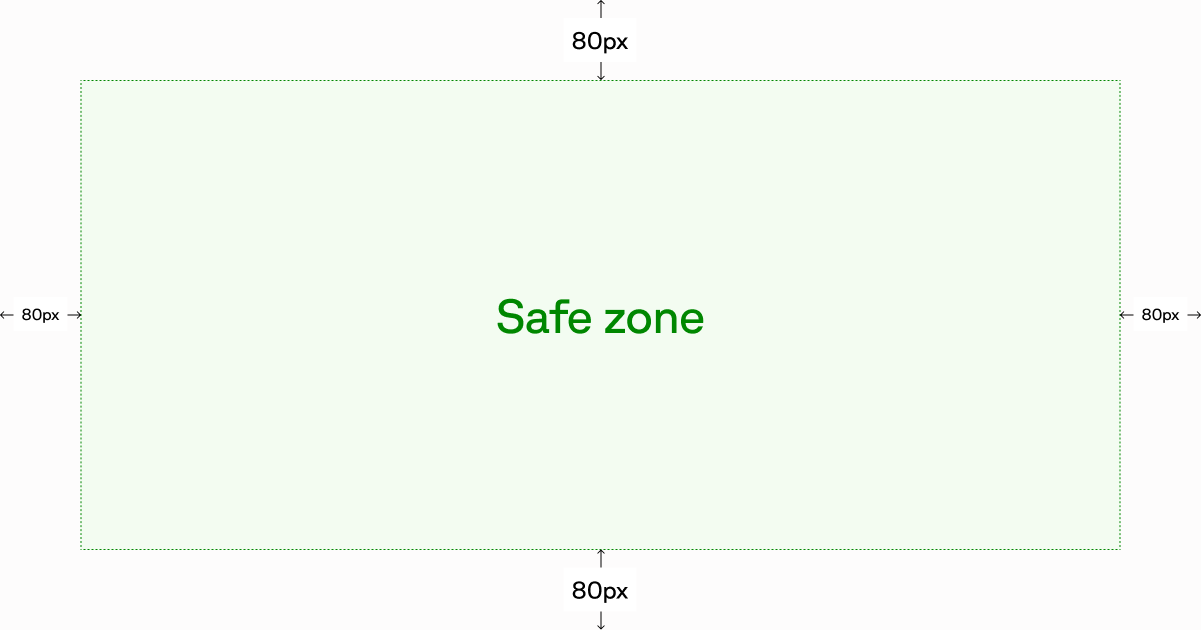
Keep important visual content inside the safe zone — the central area with 80px of padding on all sides. The page title, description, logo, and URL render on top of the background, so any artwork outside the safe zone may be covered or cropped depending on the platform.
metadata.og:dynamic:text-color
Override the text color for dynamically generated OG images. Accepts any valid CSS color value (e.g., "#1a1a1a"). By default, Fern reads the text color from your theme (grayScale[11]). If no theme color is available, falls back to #ffffff for dark mode or #1a1a1a for light mode. Must differ from og:dynamic:background-color so the text remains visible.
metadata.og:dynamic:background-color
Override the background color for dynamically generated OG images. Accepts any valid CSS color value (e.g., "#ffffff"). By default, Fern reads the background color from your theme. If no theme color is available, falls back to #0A0A0A.
metadata.og:dynamic:logo-color
Choose which logo variant to render in dynamically generated OG images. Accepts dark or light, matching the corresponding entry under the top-level logo: setting in your docs.yml. If your docs.yml only defines one logo variant, that variant is used regardless of this setting. Has no effect when og:dynamic:show-logo: false.
metadata.og:dynamic:show-logo
Toggle visibility of the logo in dynamically generated OG images. Defaults to true when og:dynamic is enabled.
metadata.og:dynamic:show-section
Toggle visibility of the section title in dynamically generated OG images. The section title is derived from the page’s navigation breadcrumb. Defaults to true when og:dynamic is enabled.
metadata.og:dynamic:show-description
Toggle visibility of the page description in dynamically generated OG images. The description is extracted from the page’s frontmatter (description, subtitle, or excerpt). Defaults to true when og:dynamic is enabled.
metadata.og:dynamic:show-url
Toggle visibility of the page URL in dynamically generated OG images. Defaults to true when og:dynamic is enabled.
metadata.og:dynamic:show-gradient
Toggle visibility of the accent gradient overlay in dynamically generated OG images. The gradient uses your accent color. Defaults to true when og:dynamic is enabled.
Twitter / X
Controls how your docs appear in Twitter Card previews when shared on X.
metadata.twitter:title
The title shown in Twitter Card previews. Falls back to og:title (and then to the page title) when unset.
metadata.twitter:description
The description shown in Twitter Card previews. Falls back to og:description (and then to the page description) when unset.
metadata.twitter:handle
Your company’s Twitter handle. No default; the tag is omitted when unset.
metadata.twitter:image
The image shown in Twitter Card previews. Falls back to og:image when unset.
metadata.twitter:site
The Twitter handle for your website. No default; the tag is omitted when unset.
metadata.twitter:card
The Twitter Card type. Options are summary, summary_large_image, app, or player.
Page-level overrides
Configure SEO metadata in your page’s frontmatter to control how individual pages appear in search results and social shares. These settings override site-wide defaults.
Only the documented SEO fields are added to the HTML <head> as meta tags. Custom frontmatter fields won’t automatically appear in your page metadata. To add custom metadata, use custom JavaScript.
Basic metadata
Page title, URL, and keyword fields used by search engines. Use headline when you need a different title for search engines than what appears as the visible page heading.
headline
When set, the <title /> tag in the document head will use this value rather than the title property. For example, your title might be “Quickstart” (shown in the sidebar and as the H1), while headline could be “Quickstart | PlantStore API Docs” to give search engines more context. If not set, Fern uses title with your site name appended.
canonical-url
Overrides the canonical URL for this page. Must be a full URL including the protocol (e.g., https://buildwithfern.com/learn/docs/content/frontmatter). Defaults to the page’s resolved URL when unset.
keywords
Comma-separated keywords relevant to the page (e.g., plants, garden, nursery). Accepts only comma-separated strings, not arrays. No default; the tag is omitted when unset.
Open Graph
Controls how this page appears when shared on LinkedIn, Slack, Discord, and other platforms that support Open Graph. Keep titles between 50–60 characters and descriptions between 150–160 characters for optimal display.
og:site_name
The name of your website as it should appear when your content is shared. Falls back to the site-wide metadata.og:site_name from docs.yml.
og:title
The title of your page as it should appear when your content is shared. Falls back to the page’s title when unset.
og:description
The description of your page as it should appear when your content is shared. Falls back to the page’s description, subtitle, or excerpt when unset.
og:url
The URL of your page. Falls back to the page’s resolved URL when unset.
og:image
The URL of the image displayed when your content is shared. Falls back to the site-wide metadata.og:image from docs.yml.
og:image:width
The width of the image in pixels. No default; only used when og:image is set.
og:image:height
The height of the image in pixels. No default; only used when og:image is set.
og:locale
The locale of the page, typically in the format language_TERRITORY (e.g., en_US). Falls back to the site-wide metadata.og:locale from docs.yml.
og:logo
The URL of your logo image displayed when your content is shared. Falls back to the site-wide metadata.og:logo from docs.yml.
Twitter / X
Controls how this page appears in Twitter Card previews when shared on X.
twitter:title
The title of your page as it should appear in a tweet. Falls back to og:title (and then to the page title) when unset.
twitter:description
The description of your page as it should appear in a tweet. Falls back to og:description (and then to the page description) when unset.
twitter:handle
The Twitter handle of the page creator or site. Falls back to the site-wide metadata.twitter:handle from docs.yml.
twitter:image
The URL of the image displayed in a tweet. Falls back to og:image when unset.
twitter:site
The Twitter handle for your website. Falls back to the site-wide metadata.twitter:site from docs.yml.
twitter:url
The URL of your page. Falls back to og:url (and then to the page URL) when unset.
twitter:card
The type of card used for sharing on Twitter. Options: summary, summary_large_image, app, player.
Indexing
Control whether search engines index this page or follow its links. These are distinct: noindex removes the page from search results entirely, while nofollow keeps the page in results but tells search engines not to pass ranking credit through its links.
Use noindex for pages you want visible in the sidebar but excluded from search results — for example, early-access documentation. To hide a page from both the sidebar and search results, use hidden: true in docs.yml instead, which handles both automatically — see Hiding content for details. Use nofollow sparingly — it’s rarely needed for documentation.
noindex
If true, the page won’t be indexed by search engines and will be excluded from llms.txt endpoints.
nofollow
If true, search engines won’t follow any links on the page.

